Largest Contentful Paint (LCP) is the Core Web Vital that most WordPress sites fail. It measures how long it takes for the largest visible element, usually a hero image, a slider or a big heading, to appear on screen. Google wants it under 2.5 seconds for real visitors. Above 4 seconds is rated poor.
LCP is also the metric with the biggest weight in the PageSpeed Insights performance score, so fixing it usually lifts your whole score. Here is the step-by-step process we use on client sites.
Step 1: Find your LCP element
Run your page through PageSpeed Insights and open the diagnostic called Largest Contentful Paint element. It shows exactly which element is the LCP and splits the time into four parts: Time to First Byte, resource load delay, resource load duration and element render delay. This breakdown tells you where to focus.
- High Time to First Byte: the server is slow. Go to step 2.
- High load delay: the browser discovers the image too late. Go to step 3.
- High load duration: the file is too big. Go to step 4.
- High render delay: CSS, fonts or JavaScript are blocking rendering. Go to steps 5 and 6.
Step 2: Reduce server response time (TTFB)
If the server takes a second to respond, LCP can never be fast. Turn on full page caching so visitors get a ready-made HTML file instead of WordPress building the page each time. Use a current PHP version, enable an object cache such as Redis if your host supports it, and consider a CDN that can cache HTML close to your visitors. If TTFB is still high after caching, the hosting is probably underpowered.
Step 3: Make the LCP image load first
The most common LCP problem on WordPress is that the hero image is lazy loaded. Lazy loading is great for images further down the page, but for the first visible image it tells the browser to wait. Exclude the hero image from lazy loading and add a preload hint with high priority, for example fetchpriority="high". Most modern caching plugins and page builders can do both automatically for the first image.
Also watch out for hero images set as CSS backgrounds or loaded by sliders through JavaScript. The browser cannot discover them early. Where possible, use a normal image element for the hero, and avoid sliders above the fold.
Step 4: Shrink the image
Convert the hero image to WebP or AVIF, resize it to the size it is actually displayed at, and serve a smaller version on mobile through responsive images. A 2 MB JPEG hero can usually become 100 to 200 KB with no visible difference. If the LCP element is text, this step does not apply, but fonts do (see step 6).
Step 5: Remove render-blocking CSS and JavaScript
Even when the image has downloaded, the browser cannot show it until it has processed the CSS and any blocking JavaScript in the head. Generate critical CSS for the top of the page and load the rest asynchronously, remove unused CSS, and defer or delay JavaScript that is not needed for the first view. Test interactive parts such as menus, sliders and forms after each change.
Step 6: Fix font loading
If your LCP element is a heading, web fonts are often the delay. Host fonts locally instead of loading them from Google Fonts, preload the main font file, use font-display: swap, and limit the number of font weights you load. Each extra weight is another file the browser has to fetch.
Step 7: Delay third-party scripts
Chat widgets, analytics, ad scripts and pixels compete with your LCP image for bandwidth and the main thread. Delay them until the visitor interacts with the page. This often improves LCP on mobile by a second or more on its own.
Step 8: Measure again, then check field data
Re-test in PageSpeed Insights after each change so you know what helped. Remember that the top of the report shows field data from real Chrome users over the last 28 days, so improvements there take a few weeks to appear. The Core Web Vitals report in Google Search Console will show when your pages move from poor to good.
Real example: LCP from 5.6 seconds to 1.2 seconds
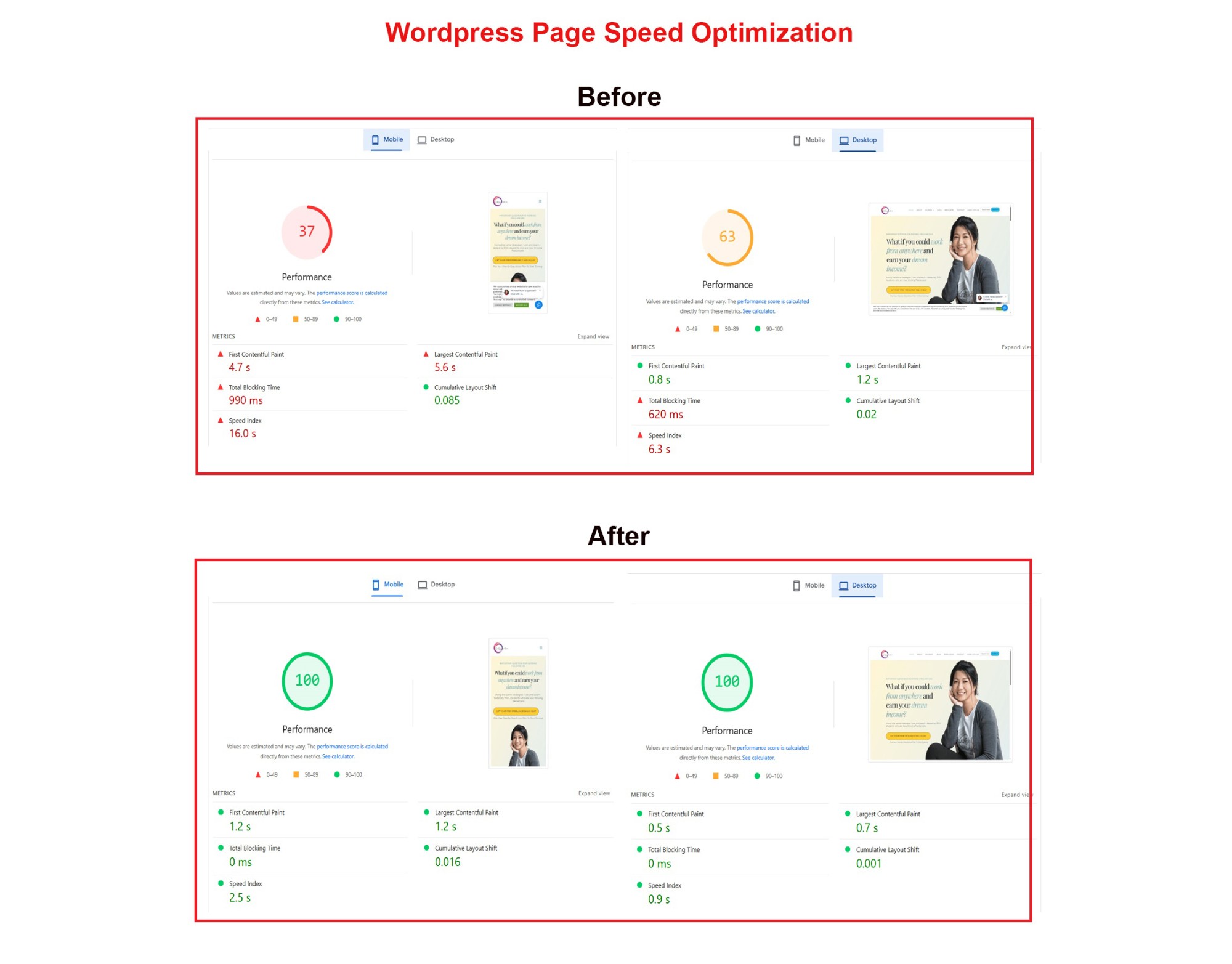
This online course website had a large hero image, render-blocking fonts and heavy third-party scripts. Following the steps above, mobile LCP dropped from 5.6 seconds to 1.2 seconds, and the mobile PageSpeed score went from 37 to 100, with the design unchanged.
Need help fixing LCP?
LCP problems often have more than one cause, and the right fix depends on your theme, page builder and hosting. Our WordPress speed optimization service targets 90–95+ on both mobile and desktop at a fixed price. Request a free audit and we will show you what is slowing your LCP down.
One Response